
M.L. Sebastian is now br8n.

Personal AI Brain

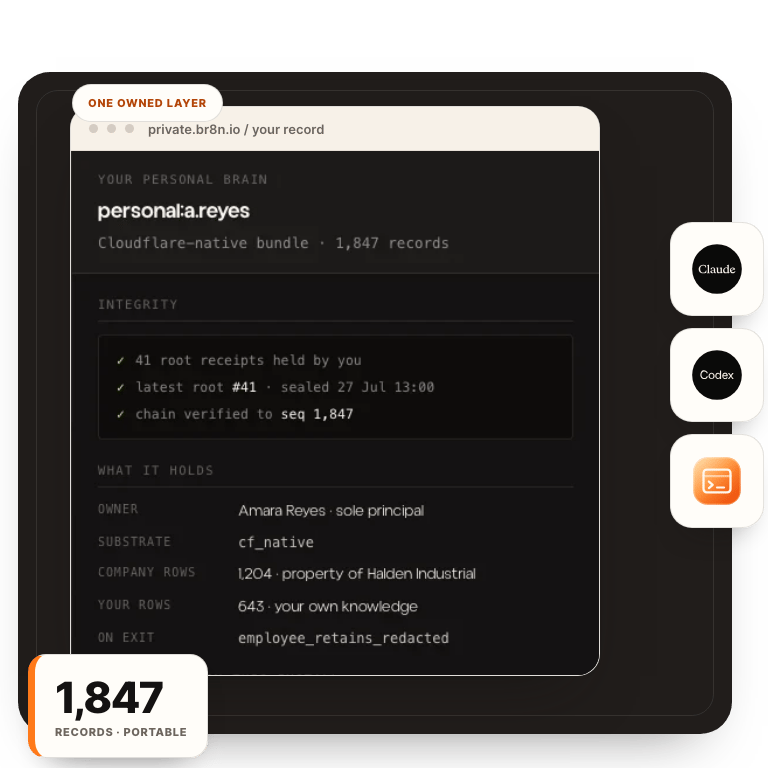
A personal AI brain you own

Your decisions, your history, and how you work, in files on your machine. Claude, ChatGPT, Cursor, or the next model can read them. You keep them.

The plain answer

A memory for your work, in files you own.

A personal AI brain is a working memory for your job that you own: your decisions, project history, preferences, and how you work, kept as plain files an AI assistant can read. It lives outside any single AI product, so the same files brief ChatGPT, Claude, or whatever you use next.

That separation is the whole design. The model can change. Your memory does not have to start from zero when it does.

The model is rented. The memory should not be.

The full answer

Do I need a personal AI brain or is ChatGPT memory enough?

It depends on what your work loses when the memory resets. If you use AI casually, the built-in memory in ChatGPT or Claude is probably enough: it holds preferences and a sketch of past chats, and the stakes of losing it are low.

The calculation changes when accumulated context is part of how you earn. A consultant’s client history, an operator’s decisions and exceptions, a writer’s voice — re-explaining that from scratch every session is a real cost, and so is discovering that years of it are locked inside one login you might cancel. That is the quiet form of lock-in: not a contract, just a memory you can’t take with you. People who hit it say the same thing — you don’t really own it.

The observation this page rests on: what you can read in plain text without logging in anywhere is yours; everything else is a feature. A personal AI brain is the yours column. For why the resets happen at all, see why AI forgets.
What goes in it?

Less than people expect. A personal AI brain is not an archive of everything you have ever written. It is a small set of short files that carry what a capable assistant needs to work like it knows you:

  • How I work. Your standards, your process, what a finished piece of work looks like, what you refuse to do.
  • Decisions. The calls you already made and the reasoning: pricing, positioning, tools, boundaries. This is what lets a tool push back instead of agreeing with everything — it can cite your own decision back at you when a new idea contradicts it.
  • Exceptions. Where your rules bend, and for whom. The part no generic assistant can guess.
  • Voice.A few samples of writing that sounds like you, so drafts start in your register instead of a press release’s.
  • Current work. One page per live project: where it stands, what is decided, what is open.

Each file is a page or two. Written once, updated when reality changes. Most people can draft the first version in an afternoon, and the structure is the same one context engineering applies to a whole business.

Can I move it between ChatGPT and Claude?

Yes, and this is the technical heart of the idea. Because the brain is markdown files rather than a vendor feature, every model can read it. The simplest move is manual: attach or paste the relevant files at the start of a session. It is unglamorous and it works today, in any tool.

The connected version uses the Model Context Protocol (MCP), an open standard for giving AI tools access to outside data. An MCP server sits in front of your folder and any compatible assistant — Claude, ChatGPT, Cursor — can query it directly, so you stop pasting and the tool starts reading. Running npx @br8n/mcp serves a folder to any MCP-compatible model, free, no account required.

Either way, the property that matters is the same: the memory is not inside any product. Switching models becomes a decision about capability and price, not about walking away from your own history.

Why is this coming up for consultants and solo operators first?

Because for them, the accumulated context is the business. A consultant moves between client environments and rarely controls which AI tools each client allows, so memory tied to one vendor login breaks every time the environment changes. An operator running a small company holds pricing history, client exceptions, and process knowledge that no employer-provided tool will ever hold for them.

For that kind of work, a personal AI brain is the difference between an assistant that starts cold every engagement and one that arrives already briefed. It is owned, portable working memory in the most literal sense: your working knowledge, in files you own, wherever the work happens. Companies face the same question at a larger scale; that version is covered in owning your AI context.

How it works

Files in. Grounded work out.

  1. Your material

    Write the files

    Capture how you work, what you decided, and where the exceptions live, in short plain-text files.

  2. The reading layer

    Shape the reach

    Decide what gets found, which version wins, and how every answer points back to a source.

  3. Your tools

    Connect any model

    Use one owned memory from the assistants and work surfaces you choose, and swap them freely.

The ownership test

The difference shows when you leave.

CompareChatGPT / Claude memoryNotes tools with AIPersonal AI brain (files you own)
Who owns itThe vendorYou, inside their formatYou, outright
Moves between modelsNoPartly, via exportYes — any model reads plain files
Cites sourcesNoSometimesAnswers point back to your files
Offline / exportableNoExport varies by toolPlain text on your machine
Cost when you leaveThe memory stays behindAn export and cleanup projectNone — you already have it

Where it fits

Start personal. Add shared memory when the work requires it.

One person can own one brain without exposing everything to a team. When the company needs shared operating memory, a governed company layer can connect people without collapsing their individual work into one account. That larger shape is the Company Install.

  • You re-explain the same context across AI tools.
  • Your best work is scattered across files and accounts.
  • Changing vendors or jobs should not erase what you built.

Own the layer underneath

Build the brain once.

The audit maps what you already have and which files are worth writing first. You keep the map either way.

FAQs

What is a personal AI brain?

A working memory for your job that you own: your decisions, project history, preferences, and how you work, kept as plain files an AI assistant can read. The tool stops being a stranger you re-explain yourself to and starts working from what you have already written down.

Do I need a personal AI brain or is ChatGPT memory enough?

If you use one tool casually, built-in memory is probably enough. If your work depends on accumulated context — clients, decisions, a way of working — you need memory that survives a vendor change. ChatGPT memory stays with ChatGPT. Files you own brief any model and leave with you.

What goes in a personal AI brain?

Short plain-text files: how you work, the decisions you have already made, the exceptions to your own rules, notes for handing work over, and samples of your voice. Each file is a page or two, written once and updated when reality changes. Most people can start theirs in an afternoon.

Can I move a personal AI brain between ChatGPT and Claude?

Yes. Because the brain is plain files rather than a vendor feature, any model can read it. You can paste or attach the files directly, or serve the folder to compatible tools over an open connection standard, so ChatGPT, Claude, and Cursor all read from the same memory.

How is a personal AI brain different from ChatGPT or Claude memory?

Vendor memory lives inside one product, is capped, and is opaque about what it keeps. A personal AI brain is a structured set of files you hold in a portable format. It works across Claude, ChatGPT, and whatever launches next, and it leaves with you when you change tools or jobs.

Personal AI brain vs. custom GPT: which is better?

A custom GPT is fine for low-stakes personal use, but it caps at a handful of files, goes stale unless you re-upload by hand, and gives you no control over retrieval. A personal AI brain scales past that, stays current, and stays portable because you own it.

Can you take a personal AI brain to a new job or company?

Yes. Because the files are yours and sit on infrastructure you control, they move with you. Vendor memory is tied to a seat or an account and stays behind when you leave. A personal AI brain is structured to be portable by design.

Can't find what you're looking for? Talk with us